
Gravity Device


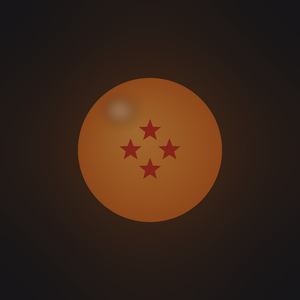
The Gravity Device is a block that raises gravity inside a sealed room, turning it into a personal training chamber. Combined with Weights, it is the fastest way to grind stats, Training Points and mastery outside the Hyperbolic Time Chamber.
This page covers how to build and use the machine. For what gravity does to you, see Gravity.
Crafting
The top slot takes any weight item (Turtle Shell, Workout Weights or Weighted Cape). See Weights and Dragon Radar.
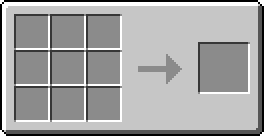
 Redstone RepeaterRedstone Repeater
 Turtle Shell
 Workout Weights
 Weighted Cape
 Radar's CPU (Earth)
 Block of IronRedstone RepeaterBlock of IronRedstone Repeater
 Anvil
Anvil Gravity Device
Setting it up
- Build a sealed room. The device needs an enclosed room between 5 and 25 blocks on each side by default. It scans the space and only works if the room is properly closed off (see the next section).
- Place the Gravity Device inside the room.
- Power it with Star Energy. Like Dr. Kikono's Station, the device runs on Star Energy: connect it to a Fuel Generator (which burns furnace fuel) with Energy Cables (see Armor). Its buffer holds up to 20,000 energy.
- Set the target gravity in the device's menu: type a value and press Set, anywhere from 1× up to 1000×. Then press Turn On.
- While it is on, powered and the room is valid, everyone inside the room feels that gravity, added on top of the dimension's own gravity. A visual effect covers the screen, growing with the device's gravity up to full intensity at 60×.
The menu shows the stored energy and the device status:
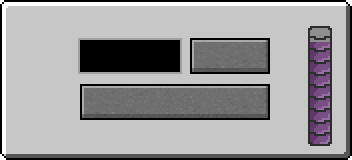 Gravity Device10SetTurn OnIdleStar Energy
| Status | Meaning |
|---|---|
| Active: N× gravity | Running normally. |
| Invalid room (5-25 blocks each side) | The room isn't sealed or is the wrong size. |
| Out of Star Energy | Refuel the generator. |
| Idle | The device is turned off. |
Energy cost: the device burns 1 energy per second for each × of gravity, so 100× gravity costs 100 energy per second. Higher gravity drains the buffer faster, so keep fuel flowing. If several devices overlap, the strongest one applies.
Building the room
The device checks the room by flood-filling outward from itself in every direction. A spot only counts as "inside the room" if it is completely empty (no collision at all). This means:
- Any full block seals the room. Stone, wood, glass and other full blocks all work as walls, floor and ceiling.
- Partial blocks don't seal it. Slabs, stairs, fences, carpets and anything else with a partial hitbox count as open to the scan. Even a single slab gap makes the room invalid: the scan escapes past the maximum size and the check fails.
- Doors and trapdoors always seal the room, open or closed, so you can use them as an entrance.
- The empty space inside must measure between 5 and 25 blocks on every axis by default. If it is smaller or bigger, or if any gap lets the scan escape, the menu shows Invalid room (5-25 blocks each side) and the device won't apply gravity.
- The device doesn't need to be centered or on the floor: place it anywhere inside the sealed space.
- The room is checked again every 5 seconds while the device is on, so breaking a wall switches the gravity off.
Using it with weights
Gravity and weights multiply each other, and this is the key combo:
- Your effective weight is your worn weight multiplied by gravity. Weights that barely register at normal gravity are pushed into the Ideal or Pushing Hard training zone under a gravity machine, giving the big ×2 to ×2.5 TP multiplier.
- Gravity also adds a flat bonus: about +2.5% TP and +0.25% mastery per point of net gravity.
The trade-off: high gravity also weakens and slows you. Movement, jumping and flight are penalized, and overloading yourself with too much weight cuts your stats. Find a gravity and weight combo that keeps your load in the Ideal zone for safe, fast training, or push into the heavy zone for maximum gains while you accept being weaker. See Weights and Gravity.
Gravity Room upgrades
Bulma can upgrade your device through two sidequests, Gravity Room Mk.II and Gravity Room Mk.III. Once completed, they cut the stat penalty from overloading on weights while you're inside an active device's room. Mk.III cuts more than Mk.II, and the help shrinks as you get stronger (see Gravity).
Recommended loop
Build a sealed room, power the device, equip weights, set a gravity you can handle, then train (fight, spar or grind) inside. See Training Points and Mastery for everything that grants TP and mastery.